An alarm for a specific date on iPhone.
On the day, at the time.
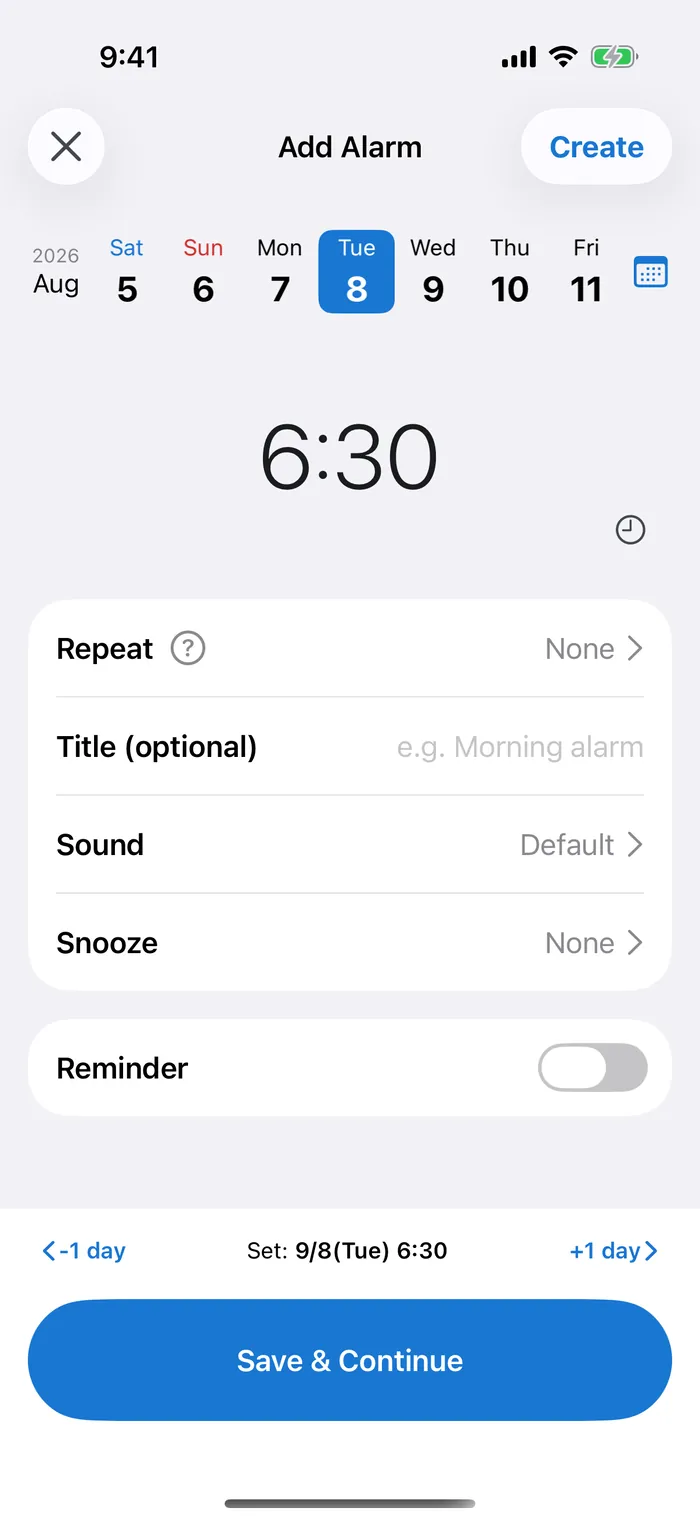
Pick a date and time and it rings on that exact day — the one-time alarm the built-in Clock app can't do. It even rings on silent.
Sound familiar?
The built-in iPhone alarm only lets you pick a time — not a specific date. CAlarm is a date-specific alarm: choose the day and time, and it rings exactly then.
The iPhone alarm only lets you set
a time — not a date
Calendar alerts are
easy to miss
Reminders
won't wake you up
What you can do with CAlarm
Date-specific alarm
Set an alarm for '15 Apr, 2:30 PM' and it rings on that exact day and time.
Rings on silent
Built on Apple's AlarmKit (iOS 26). It rings at alarm volume even in silent or Focus mode, so a muted phone won't make you miss it.
Full-screen on the Lock Screen
Alarms fill the Lock Screen when they ring, so you notice the moment you glance at your phone.
Widget
Check your next alarm from the Home Screen without opening the app.
More features
Frequently asked questions
Can I set an alarm for a specific date on iPhone?
Yes. CAlarm lets you set a date and a time together — "15 April, 2:30 PM" — and it rings on that day only. The built-in Clock app takes a time and repeats by weekday, so it cannot ring on one specific date. CAlarm registers with Apple's AlarmKit (iOS 26), so it rings at ringer and alarm volume even on silent or in Focus, and takes over the Lock Screen. One-time alarms are deleted for you once they have rung, if automatic cleanup is on. Requires iOS 26.0 or later; the core features are free.
What is a date-specific alarm?
A date-specific alarm rings on a date and time you choose, rather than on a weekday. The built-in Clock app can do "every Monday at 7" but not "7am on 15 April only". CAlarm is built for date-specific alarms: ring once on the day you pick, or repeat from that date — every two weeks, monthly or yearly. It rings as an alarm, not a notification, so it sounds even on silent.
Can I set an alarm months ahead, or for next year?
Yes. A one-time alarm in CAlarm takes any date you pick, so next week's appointment, an exam in three months and next year's anniversary can all be set the moment you know the date. There is nothing to re-arm the night before, and the list shows everything still to come, in order.
Can it ring only on certain days, not every day?
Yes. Leave the repeat set to Never and the alarm rings once, on the date you chose. For several dates, long-press an alarm to duplicate it and change the date. If the days follow a pattern, Premium adds repeats every two weeks, on a day of the month, on the 2nd Friday or last Wednesday of the month, and yearly.
How is it different from the built-in iOS alarm?
The built-in alarm takes a time, not a date, and repeats only by weekday — so "9am, three weeks from now" is not something it can hold. CAlarm takes both a date and a time, and adds repeats the built-in alarm has no equivalent for: every two weeks, monthly by date, the 2nd Friday or the last Wednesday of the month, and yearly. The Reminders app does hold dates, but it normally arrives as a notification, which stays silent on silent mode; since iOS 26.2 it rings as an alarm only if you mark each reminder urgent. CAlarm registers as an alarm with iOS, so it rings at alarm volume regardless.
Does it ring on silent mode?
Yes. CAlarm is built on Apple's AlarmKit (iOS 26), so it rings in silent and Focus mode. It uses the ringer and alarm volume, not the media volume, so you'll hear it even with media turned down.
Does it show on the Lock Screen?
Yes. Alarms and reminders appear full-screen on the Lock Screen and in Live Activity / Dynamic Island, so you notice at a glance.
Can I set recurring alarms by weekday?
Yes, in any combination from Monday to Sunday — every Monday and Thursday at 9:00, for example. Weekly is the one repeat handed straight to the system (AlarmKit), so it keeps ringing indefinitely without opening the app. The other patterns — biweekly, monthly by date, nth-weekday, last-weekday and yearly — are Premium, and because each occurrence is registered individually they are topped up a few at a time (six for biweekly, three for monthly, two for yearly) whenever you open CAlarm.
Can I repeat an alarm on the same date every month?
Yes. You can repeat by date, such as the 25th of every month. If you pick the 31st, months without a 31st are skipped automatically. The built-in iOS alarm only repeats by weekday, so monthly repeats are unique to CAlarm.
Can I set a repeat like "the 2nd Friday of every month"?
Yes. CAlarm repeats by the position of a weekday in the month — the 2nd Friday, the 3rd Tuesday, and so on. The 1st through 4th are supported, plus "the last weekday of the month" for month-end routines. Pick the date you want as the basis and the matching repeat appears as an option.
Do you support biweekly and yearly repeats?
Yes. CAlarm supports every-two-weeks repeats and yearly repeats on the same date — useful for alternating collections, fortnightly appointments, birthdays and annual renewals.
Can I get a pre-alert before an event?
Yes. A one-time alarm can carry a pre-alert at any of nine intervals: 5, 10, 15 or 30 minutes, 1 or 2 hours, 1 or 2 days, or a week before. Each pre-alert holds a title, a note and a URL, so the queue page for a ticket sale or a map to a venue travels with it. A schedule can also hold several pre-alerts, plus time notes — markers that post no notification at all.
Can I change the alarm sound?
Yes, per alarm. The list runs from classic tones (buzzer, digital, analog, doorbell, machine, whistle) through nature sounds (birdsong, jungle, forest, running water), music box, songs, seasonal tones for Christmas and Halloween, emergency tones including the Japanese disaster alert, and "none" if you want the screen without the sound. Every row has a preview button, and volume — Low, Medium or High — sits on the same screen. Alarms play at ringer and alarm volume, not media volume.
Can I change how long snooze lasts?
Yes. Snooze can be off, any whole number of minutes from 1 to 30, 45 minutes, 60 minutes, or 2 to 12 hours, set per alarm. The built-in iPhone Clock uses a fixed interval you cannot change.
My alarm sounds too quiet. What can I do?
Alarm volume is set on the sound screen at low, medium or high, and it plays at ringer and alarm volume rather than media volume. Turning a video down before bed does not affect it. Changing the tone often helps more than raising the volume.
My alarm did not ring. What should I check?
Check the sound setting first. If the sound is set to "None" the alarm still takes over the screen but stays quiet. Volume is a separate setting with Low, Medium and High, so it is worth checking that it is not simply set low. Silent mode and Focus are not the cause: CAlarm registers with Apple's AlarmKit (iOS 26), so it rings at ringer and alarm volume regardless.
Could I just use a calendar alert or a Shortcuts automation?
Either one holds a date, so for that part, yes. A calendar alert arrives as a notification, which means it stays silent on silent mode and gets held back by Focus. A Shortcuts automation can fire at a set time, but you build one per occasion, and since it is not an alarm, stopping and snoozing are yours to build as well. CAlarm registers as an alarm with iOS, so it rings at alarm volume on silent and takes over the Lock Screen.
Do alarms clean themselves up after they ring?
If automatic cleanup is switched on in settings, one-time alarms are deleted once their time has passed. What is left in the list is only what is still coming, so you never have to work out which of a dozen switched-off rows is the one for tomorrow. Leave it off and they stay as a record. Recurring alarms are unaffected; they have an on/off toggle instead.
Are there widgets?
Yes. The Home Screen has an alarm widget showing what rings next, and a calendar widget in three sizes listing alarms, pre-alerts and time notes in time order. The Lock Screen widget is a Premium feature.
Can I change the theme colour or use dark mode?
Yes. Ten theme colours are available, with a matching app icon. Dark mode can follow the system or be pinned to light or dark. The font and text size (seven steps) can also be changed. A fully custom colour is a Premium feature.
What does Premium unlock?
The advanced repeats (biweekly, monthly, monthly-by-nth-weekday, last weekday, yearly) and the Lock Screen widget, and it removes ads. It is a one-time purchase with no auto-renewal.
Does it work on iPad?
Yes. It runs on both iPhone and iPad (iOS 26.0 or later). On iPad the layout uses the extra width: a sidebar switches between Alarms and Calendar, the calendar shows the month and the day's plans side by side, and adding or editing an alarm opens as a form sheet over the list. A Premium purchase made with the same Apple Account works on both devices.
Does the iPhone alarm ring on silent mode?
The built-in Clock alarm does ring on silent. It is registered with the system as an alarm, so the silent switch does not mute it. What goes quiet is anything delivered as a notification — calendar alerts, most reminder apps, and Reminders unless marked urgent (iOS 26.2 or later) — and that is the usual reason people think an alarm was silenced. CAlarm registers its alarms through Apple's AlarmKit (iOS 26), the same mechanism the built-in alarm uses, so it also rings at ringer and alarm volume in silent, Focus and Do Not Disturb.
There are other apps called "Calarm" on the App Store. Which one is this?
CAlarm is made by LegStart Inc. On the US App Store it is listed as "Date Alarm & Shift Calendar", with App Store ID 6759246387. Several unrelated apps share the name "Calarm" — they are different apps from different developers. The App Store link on this site (calarm.legstart.com) points to this one.
Is CAlarm free?
The core is free: date-and-time alarms, weekly repeats, pre-alerts, schedules, the calendar and the Home Screen widgets. In-app purchases are one-time only — there is no subscription and nothing renews. There are three: Remove Ads at $3.99, Theme Color (a colour of your own, and a matching app icon) at $0.49, and Premium at $5.99, which covers both of those plus the advanced repeats (biweekly, monthly, nth-weekday, last-weekday, yearly) and the Lock Screen widget. If you buy one of the smaller items first, upgrading to Premium costs only the difference. Prices are for the US store as of September 2026.
Start your
date-specific alarm.
Download on the App StoreRequires iOS 26.0 or later