Why notification apps go quiet
A notification is subject to the silent switch and to Focus. That is the point of both features, and it is the right behaviour for most apps. It is the wrong behaviour for something you set specifically so you would not miss it, and the difference is invisible until the moment it fails.
An alarm is a different kind of thing
CAlarm alarms are registered with the system as alarms, not as notifications. They play at ringer and alarm volume rather than media volume, which means turning the video volume down before bed does not quiet them. Focus and Do Not Disturb do not hold them back either.
Full screen on the Lock Screen
When a CAlarm alarm fires it takes the whole Lock Screen, so a glance is enough to see what it is. Live Activity and the Dynamic Island show a snoozed alarm counting down. You do not have to unlock to work out what just went off.
Nothing to remember the night before
There is no toggle to arm and no mode to remember to leave. CAlarm registers its alarms with iOS as alarms, so ringing on silent is simply how they behave. The night you forget to check is the night it still works, which is the entire point.
When you want the opposite
Not everything should make a noise. A schedule can carry pre-alerts, which arrive as notifications, and time notes, which make no sound at all and exist purely as markers on the day. Loud where it matters, quiet where it does not, without muting the app as a whole.
Three different things can silence a phone
The silent switch, Focus, and Do Not Disturb are separate settings, and people usually blame the wrong one. The switch is physical and mutes rings and alerts. Focus filters by who and what, so a message from one person can arrive while everything else waits. Do Not Disturb is one of those Focus modes. A CAlarm alarm is unaffected by all three, because it is registered as an alarm rather than delivered as a notification.
Volume is set on the alarm, not on the phone
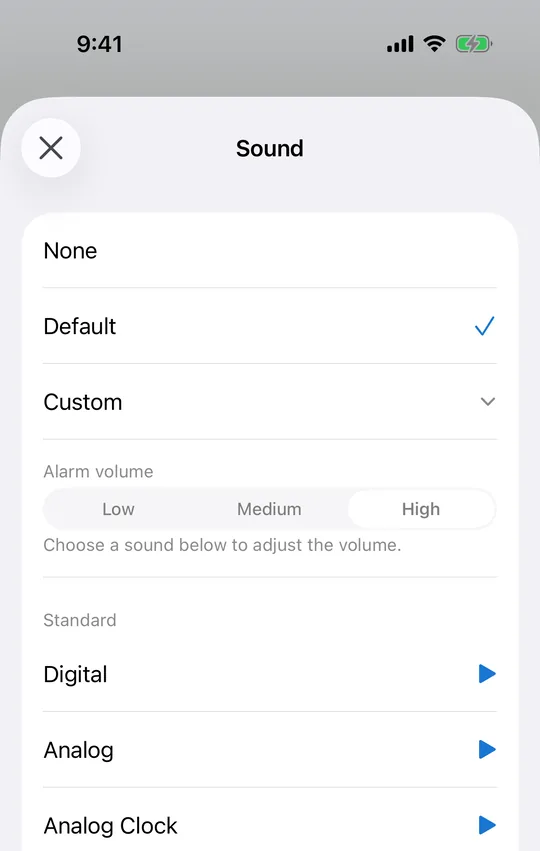
Each alarm carries its own volume — low, medium or high — chosen when you create it. That setting is independent of the media slider, so an evening spent with the video volume at zero changes nothing about how the alarm sounds in the morning. Snooze is set per alarm too, anywhere from one minute to twelve hours, which matters more than it sounds when the alarm is for a shift rather than a lie-in.
If an alarm still did not sound
Check what it was, first. A pre-alert is a notification by design — there are nine of them, from five minutes to a week ahead — and notifications do respect the silent switch. That is the intended behaviour: the pre-alert is a nudge, the alarm is the thing that wakes you. A time note makes no sound at all and never did. If the alarm itself was the one that stayed quiet, check its volume, and confirm the device is on iOS 26 or later, since AlarmKit is what gives an alarm this behaviour in the first place.