Low, medium or high, per alarm
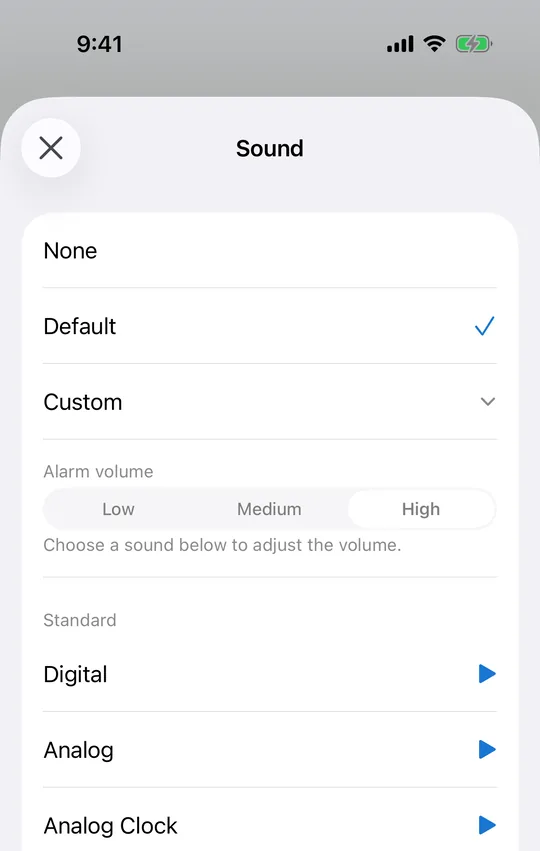
The CAlarm sound screen sets both the tone and its volume, at low, medium or high. Keep it low when someone else is asleep in the room and high for the morning you cannot miss. A preview button plays it there, so you find out before the alarm does.
Media volume does not hold it back
CAlarm alarms are registered as alarms rather than notifications, so they play at ringer and alarm volume. Watching something quietly before bed, or muting the phone entirely, leaves the alarm at whatever you set it to.
Sometimes the tone matters more than the volume
When volume is not the problem, changing the sound often is. CAlarm has 25 tones, from birdsong, forest and music-box through to emergency, siren and the Japanese disaster alert. On a heavy night an unfamiliar sound tends to work where a louder familiar one does not.
Hear it before you rely on it
Every sound has a preview button, and the volume control sits above the list on the same screen. Set the level first, then play a few rows: what you are hearing is the combination you will get on the day, not an approximation of it.
The setting lives with the sound
Volume is not buried in a global preferences screen. Open the alarm, open Sound, choose Custom, and the volume is the first thing on it. Changing it for one alarm leaves every other alarm alone, so a loud wake-up and a quiet desk nudge can live side by side.