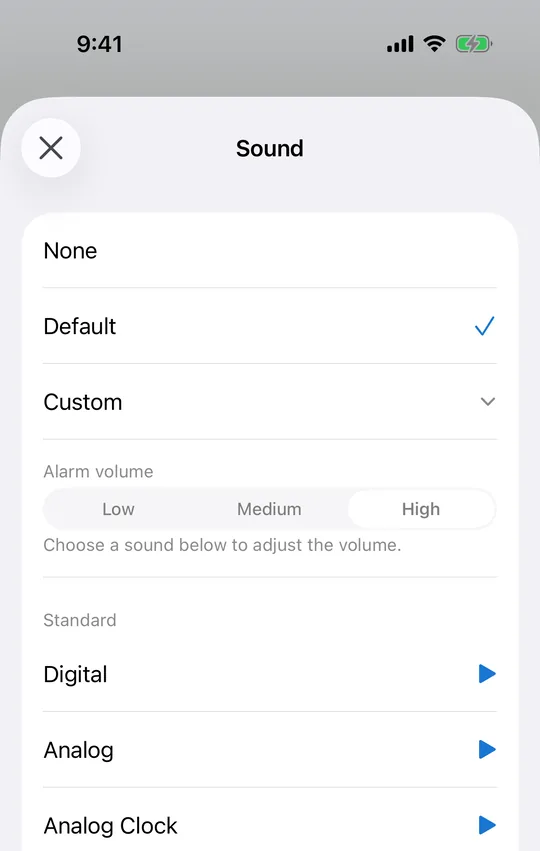
What gets chosen
Classic tones — buzzer, digital, analog, doorbell and the like — take 47.4% of all changes. The default sound accounts for 25.3%, nature sounds (birdsong, forest, running water) 9.1%, songs 5.4%, "none" 4.5%, music box 4.2%, emergency tones 2.6%, and seasonal ones 1.4%. For an app used mostly to get people out of bed, the concentration on plainly audible sounds is not surprising.
Buzzer or digital, if you cannot decide
Individually the order is buzzer 15.2%, digital 11.7%, analog 7.5% and analog clock 5.0% — nearly four in ten changes between them. Every row in the CAlarm picker has a preview button, so the sensible move is to set the volume first and then listen: what you hear is then the combination you actually get on the day.
4.5% pick no sound at all
One in twenty changes sets the sound to "none". A CAlarm alarm takes over the Lock Screen whether or not it makes a noise, so the screen alone is enough to catch it — in a meeting, a library, or a room where someone is asleep. Everything else still works: the alarm still shows, and snooze still runs.
Volume is the other half of the decision
The same sound reads completely differently at Low and at High, and in CAlarm volume is set per alarm on the same screen as the sound. A wake-up alarm at High and a desk nudge at Low can coexist. Alarms play at ringer and alarm volume rather than media volume, so turning a video down before bed does not quietly disarm the morning.
Save the emergency tones for the day that matters
Sirens and alert tones account for only 2.6%, and that is about right. They work precisely because they are unusual, so they belong on the alarm you cannot afford to sleep through — a ticket sale, a flight, an exam — rather than on the one that rings every morning until you stop hearing it.